
Implementing an ERP like Odoo isn’t just a software rollout – it’s a complete transformation of how a company operates. When done right, it results in streamlined operations, better decision-making, and happier users. But if mismanaged, it can become expensive, complex, and ultimately, a failure.
To avoid these pitfalls, here’s a practical, experience-driven guide inspired by Odoo’s proven implementation methodology and real-world learnings.
Step 1: Define Clear Objectives and Scope
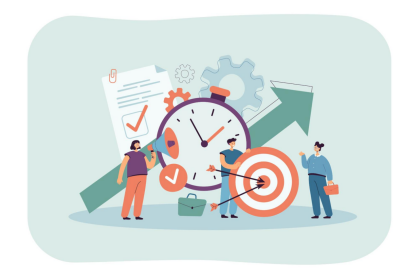
Every successful Odoo project starts with well-defined goals. What does the organization want to achieve? Is it better visibility in sales pipelines, faster invoicing, real-time inventory, or reducing manual interventions?
“A project is successful if it’s delivered on time and on budget. Custom development may seem necessary but can introduce risks and delays.”
Define what success looks like. Objectives should be measurable and business-focused, not technical. Avoid starting with a “shopping list” of features.
Example: A multi-branch company wants real-time financial consolidation, automated tax reports, and simplified vendor payments.
Deliverable: A document listing measurable goals such as:
Consolidate financial reports across branches within 2 minutes.
Automate 90% of tax return calculations and filings.
Reduce vendor payment processing time by 50% through workflow automation.
Step 2: Build the Right Implementation Team
At the core of every successful implementation is a dedicated team:
Project Leader (Odoo side): Owns the timeline, scope, and success.
SPoC (Client side): The internal champion who ensures user engagement, feedback, and validation.
Odoo Developer(s): Handles customization, module development, data migration, and technical integrations. Their expertise ensures the platform aligns with business needs.
Optional Roles: App Experts, Steering Committees (for larger projects).
“The Project Leader must wear many hats – business analyst, product expert, and project manager. Too many stakeholders slow decision-making.”
Step 3: Conduct GAP Analysis
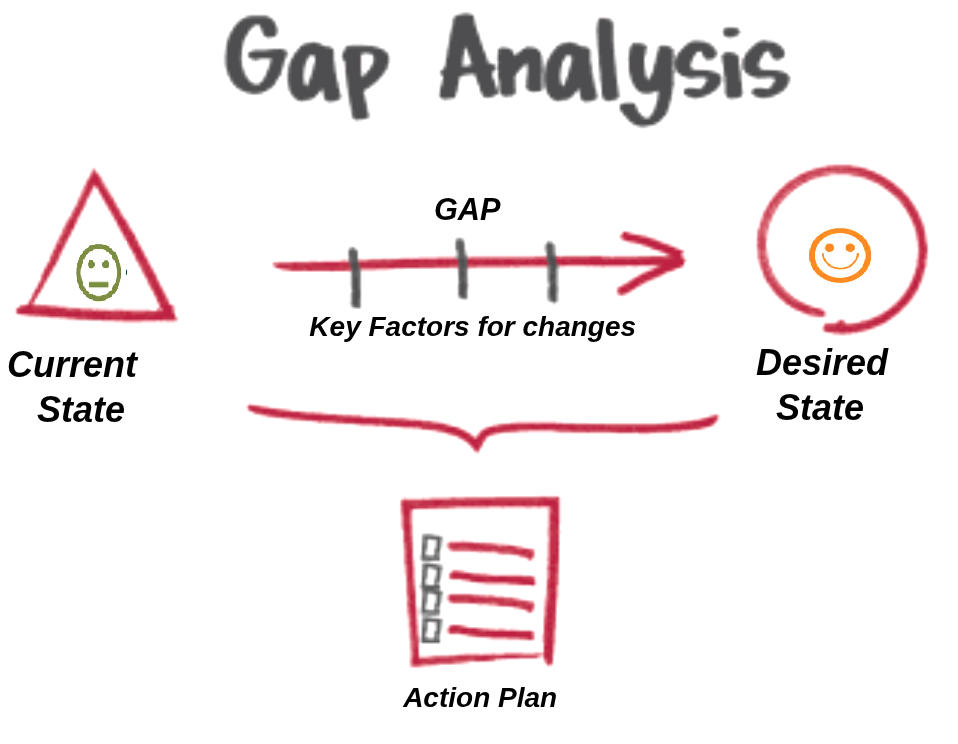
Before building anything, analyze the existing workflows. Understand how the business runs today and map it against what Odoo offers out-of-the-box. Identify gaps and determine whether they can be solved via:
Configuration
Process change
Custom development (only if essential)
Use tools like:
GAP Kick-Off templates
Key User Interview mind maps
Peer review checkpoints
“Prefer standard solutions, but use customization when it adds clear business value – while carefully managing the added complexity.”
Step 4: Manage Interfaces with External Stakeholders
Large implementations often involve coordination with external departments, vendors, or systems. This inter-group dependency must be planned and monitored carefully.
Define Interfaces Early: List all external groups involved (e.g., external payroll service, outsourced warehouse, third-party CRM).
Document Responsibilities: Use a RACI matrix or Interface Control Document (ICD).
Track Dependencies: Maintain a live tracker for deliverables from external teams.
Use Dashboards: Visualize cross-team progress using Odoo Projects, custom dashboards, or integrations.
Set Quality Gates: Verify all deliverables before internal handoff.
Competency Check: Ensure the external group is capable of delivering the assigned task or provide necessary training.
“The project plan must clearly identify dependencies on external stakeholders and include the mechanisms to track and manage them.” – Fabien
Step 5: Project Kick-Off
Once the GAP analysis is clear, gather everyone and set the tone. Communicate timelines, roles, methodology, and what “success” will look like. Be transparent about what won’t be done now.
“The whole project’s success depends on how well the Kick-Off is carried out. Set expectations clearly and never overpromise.” – Fabien
Step 5.1: Choose the Right Odoo Modules
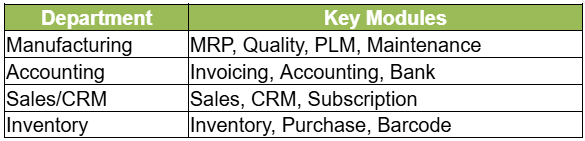
Based on the business needs identified during GAP Analysis, select only those Odoo apps that directly contribute to the goals. Avoid overloading the project with non-essential modules during the first phase. Few examples of Odoo modules are listed in table below:-
Step 5.2: Data Preparation and Cleansing
Before configuration, clean and format legacy data – vendors, products, COA, Product SKUs, Bill of Materials, customer records, Journal entries, ledgers, chart of accounts etc. Bad data leads to bad outcomes. Use Odoo’s import tools to validate templates early.
Step 5.3: Configure and Customize
Start by configuring standard features. Introduce customizations Custom workflows, fields, reports when they directly align with high-impact use cases. Use Studio for no-code changes.
Step 6: Implement in Iterative Cycles
Adopt a short-cycle delivery model:
Configure apps → Demo to users → Collect feedback → Improve
Avoid Big Bang rollouts unless necessary
While Project Leaders and Functional Consultants handle initial configuration using standard apps and Odoo Studio, developers play a critical role in each cycle by:
Supporting technical feasibility checks early,
Implementing validated customizations,
Enabling integrations and data migrations.
Their involvement is essential once user feedback points to functionality beyond standard tools.
“Deliver value regularly. Quick wins improve user adoption.”
Step 7: Validate, Train, and Test
Perform User Acceptance Testing (UAT) in a staging environment.
Train SPoC and key users by having them drive the demo and test cases.
Avoid long gaps between training and Go-Live.
“Train users to do the actual tasks. Watching demos is not enough. The mouse should be in their hands.”
Step 8: Go Live (and Be Present!)
Deployment should be swift and monitored:
Freeze legacy systems
Import clean master data
Be onsite or on-call to resolve critical issues immediately
Avoid delaying Go-Live – it invites more change requests, loss of momentum, and data inconsistency.
“It’s okay to Go Live with imperfections if you can fix them fast. Delays are worse.” – Fabien
Step 9: Post-Go-Live Support & Second Deployment
The first few weeks are crucial. Offer hypercare support. After stability:
Review pending development
Reassess the need for custom features (many won’t be required)
Plan next-phase deployment
“In many implementations, priorities evolve after Go-Live – often, 50% of initially requested customizations are re-evaluated or replaced with smarter alternatives. This is why we guide clients to focus on critical, value-driven customizations and phase others as needed. It ensures cost-efficiency while delivering the right functionality at the right time.”
Step 10: Continuous Improvement
Conduct retrospectives
Review KPIs through dashboards
Expand Odoo usage (HR, Helpdesk, Project apps, etc.)
Maintain a balance between evolution and stability
Final Thoughts: What Makes Projects Succeed
Stick to standard, Customization becomes essential when it aligns with critical business needs or unique workflows.
Short decision cycles matter.
Say “no” when needed.
Always choose simplicity over sophistication.
Define, track, and review all inter-group dependencies.
“Success is not just about delivering software. It’s about managing change, guiding people, and staying focused on the end goal.” – Fabien
Whether you’re rolling out Odoo for CRM, Accounting, Inventory, or Manufacturing – follow this approach, and your project will have the foundation it needs for success.
Ready to implement Odoo the right way?
At Confianz, we specialize in end-to-end Odoo ERP implementations tailored to your business needs.
Contact us today to schedule a free consultation and take the first step toward a successful digital transformation.