
Legacy ERP systems that once supported business growth often become bottlenecks over time. High maintenance costs, poor integration capabilities, limited scalability, and data silos restrict agility in today’s digital-first environment. This is why organizations across industries are increasingly replacing legacy ERP platforms with Odoo, a modular and future-ready ERP solution.
To ensure migration success, organizations need more than intention – they need a structured checklist. This blog provides a practical, end-to-end checklist for planning a seamless Odoo ERP migration, supported by real business outcomes and market data.
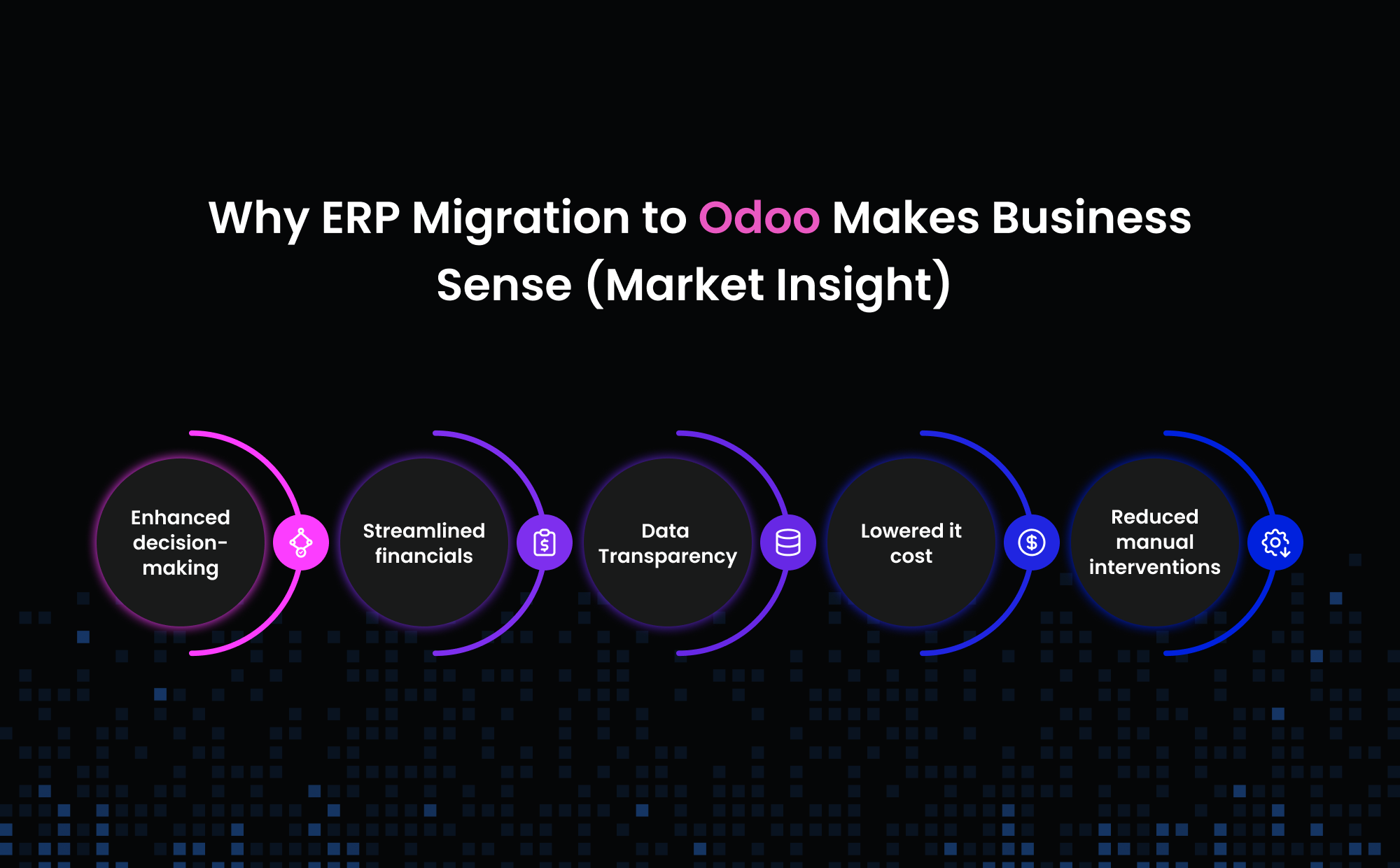
Why ERP Migration to Odoo Makes Business Sense (Market Insight)
Before diving into the checklist, let’s look at the numbers:
- ERP migration improves operational efficiency by 20–30% according to Panorama Consulting’s ERP reports.
- 95% of organizations report process improvement after ERP modernization.
- Businesses moving from legacy systems experience up to 40% reduction in IT maintenance costs.
- Odoo serves over 12 million users worldwide and is adopted by companies in 120+ countries, proving its scalability across SMBs and enterprises.
These statistics clearly show that ERP migration is not just a technology upgrade – it is a strategic business decision.
The Ultimate Odoo ERP Migration Checklist
1. Evaluate the Need for Migration
- Identify limitations of your current Legacy ERP systems (performance, cost, scalability)
- Document pain points such as manual work, data silos, or lack of integrations
- Assess long-term business growth requirements
Outcome: Clear justification for migration aligned with business needs.
2. Define a Clear Migration Vision & Goals
- Define what success looks like post-migration
- Align migration goals with business strategy
- Set measurable KPIs
Typical goals include:
- Real-time reporting and analytics
- Unified finance and accounting
- Automated workflows
- Lower IT dependency
3. Build the Right Migration Team
- Appoint an executive sponsor
- Assign a dedicated project manager
- Involve functional heads (Finance, Sales, HR, Operations)
- Engage a certified Odoo partner to lead customization, data migration, integrations, and best-practice implementation
Why this matters: ERP migration is a business transformation, not just an IT project.
4. Choose the Right Odoo Edition & Deployment Model
- Decide between Odoo Community vs Enterprise
- Select hosting: Cloud, On-Premise, or Hybrid
- Evaluate compliance, scalability, and cost
Quick guidance:
- Community → Cost-effective, flexible
- Enterprise → Advanced modules, official support
- Cloud → Scalability & minimal infrastructure overhead
5. Customize Odoo to Fit Your Business
- Identify required Odoo modules (Accounting, CRM, Inventory, HR, Manufacturing)
- Configure workflows instead of over-customizing
- Develop custom modules only when necessary
Best practice: Keep Odoo close to standard to simplify upgrades and maintenance.
6. Data Migration & Validation Checklist
- Audit legacy data
- Clean duplicate or obsolete records
- Map legacy fields to Odoo fields
- Run multiple test migrations
- Validate financial and transactional data
Critical note: Poor data migration is the #1 reason ERP projects fail.
7. User Training & Change Management
- Identify power users in each department
- Conduct role-based training sessions
- Provide user manuals and video tutorials
- Communicate benefits clearly to reduce resistance
Result: Higher user adoption and faster ROI.
8. Go-Live & Stabilization Plan
- Backup all legacy data
- Define downtime windows
- Assign support team during go-live
- Monitor transactions and reports closely
9. Post-Go-Live Optimization
- Track system performance
- Gather user feedback
- Fine-tune workflows
- Introduce advanced Odoo features gradually
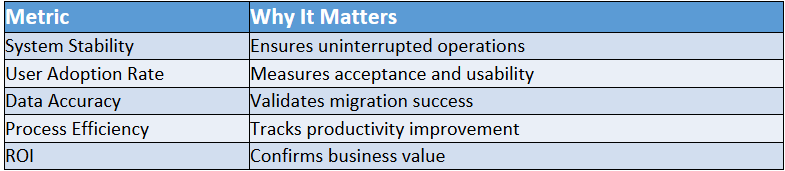
Post-Migration Success Metrics Checklist
Real Business Success Stories After Migrating to Odoo
1. Almac Imports (Wholesale Distribution)
North American wholesale company Almac Imports adopted Odoo ERP to automate key business functions, improve cash-flow visibility, and support B2B/B2C growth – achieving 40% business growth and 80% reduction in inventory write-offs.
2. SISU (Automation Machinery Manufacturing)
SISU, a U.S.-based maker of customized robotic arms, migrated from NetSuite to Odoo in just 42 days – cutting ERP costs, boosting flexibility, and enabling scalable growth with minimal customizations.
3. Ardent Mills (Manufacturing Efficiency)
Ardent Mills, a major U.S. food manufacturer, implemented Odoo’s Manufacturing and Inventory modules to reduce production delays by 20% and enhance data visibility.
4. Davnik Distributors (Wholesale & Distribution)
Sri Lanka’s Davnik Distributors improved inventory tracking and financial management with Odoo, leading to a 30% increase in fiscal efficiency after ERP implementation.
…and many more real business success stories can be found on the Odoo Customer Reviews page at https://www.odoo.com/blog/customer-reviews-6
Why Partnering with an Experienced Odoo Partner Matters
- Faster migration with proven frameworks
- Reduced risk and downtime
- Expertise in data mapping and integrations
- Ongoing support and optimization
An experienced Odoo partner turns a complex migration into a predictable, low-risk transformation.
Conclusion
Migrating from a legacy ERP to Odoo is not just a system replacement – it’s a business modernization initiative. With a clear checklist, strong leadership, trained users, and the right implementation partner, organizations can unlock agility, efficiency, and long-term scalability.
When executed correctly, Odoo ERP migration becomes a catalyst for digital transformation, cost optimization, and sustainable growth.
Planning your move to Odoo? Talk to our Odoo ERP migration experts and get a clear, risk-free roadmap tailored to your business.