

Most businesses don’t replace software that already runs their operations simply because teams need mobile access. Instead, they face practical challenges: managers cannot approve urgent requests while traveling, field technicians need customer information on-site, and sales representatives want to submit orders during client meetings.
Consider a mid-sized distribution company that relies on a custom business application to manage inventory, customer orders, dispatch schedules, and billing. The system works reliably, and employees depend on it every day. However, warehouse staff must return to desktop workstations to update stock counts, supervisors cannot easily make inventory changes from the warehouse floor, and delivery teams often call the office to confirm order details.
The problem isn’t the software itself but its limited accessibility. Replacing the entire system just to introduce mobile functionality may be unnecessary.
In many cases, businesses can extend their existing software with a custom mobile application that connects to the system they already use. This approach can preserve established workflows, business rules, and operational processes while making essential features accessible on mobile devices.
Modern integration approaches, such as APIs and managed integration services, make these connections possible without requiring a complete software replacement. However, feasibility depends on the existing application’s architecture, data accessibility, security requirements, and long-term business goals.
So, the more important question is not whether your business needs new software, but whether your existing system can support a mobile extension. This article explores how to assess that possibility, what makes integration practical, and when modernization or replacement may be the better option.
When Extending Existing Software Makes Sense
A mobile application is typically worth considering when the core business system continues to meet operational needs, but certain workflows require mobility. Common examples include:
| Business Process | Mobile Opportunity |
|---|---|
| Inventory management | Scan items and update stock in real time |
| Field service operations | Capture service reports on-site |
| Order management | Place or approve orders remotely |
| Customer interactions | Access account information during visits |
| Internal approvals | Review and approve requests from any location |
| Delivery operations | Confirm deliveries and capture signatures |
In these situations, the objective is not to rebuild the entire platform.
Instead, the goal is to expose specific functions through a mobile interface while keeping the existing software as the system of record.
Can Your Existing System Support a Mobile App?
Before development begins, assess whether your existing software can support mobile integration.
1. Are APIs Available?
APIs enable applications to exchange information. Existing APIs can simplify mobile integration by providing secure access to business functions and data.
2. Is the Database Accessible?
Older systems may contain valuable business data. However, direct database access can bypass security controls and business rules. APIs or backend services provide a controlled integration layer.
3. Is the Business Logic Defined?
Understand existing pricing calculations, approval workflows, user permissions, inventory rules, and customer-specific processes. The mobile app must preserve these rules to avoid operational risks.
4. Is the System Documented?
Review the software architecture, existing integrations, source code availability, and ongoing development support. Clear documentation helps determine integration complexity and identify improvements needed before development.
How Can a Mobile App Connect to Existing Business Software?
A mobile app needs more than a direct database connection. A structured architecture helps preserve security, business rules, and data integrity.
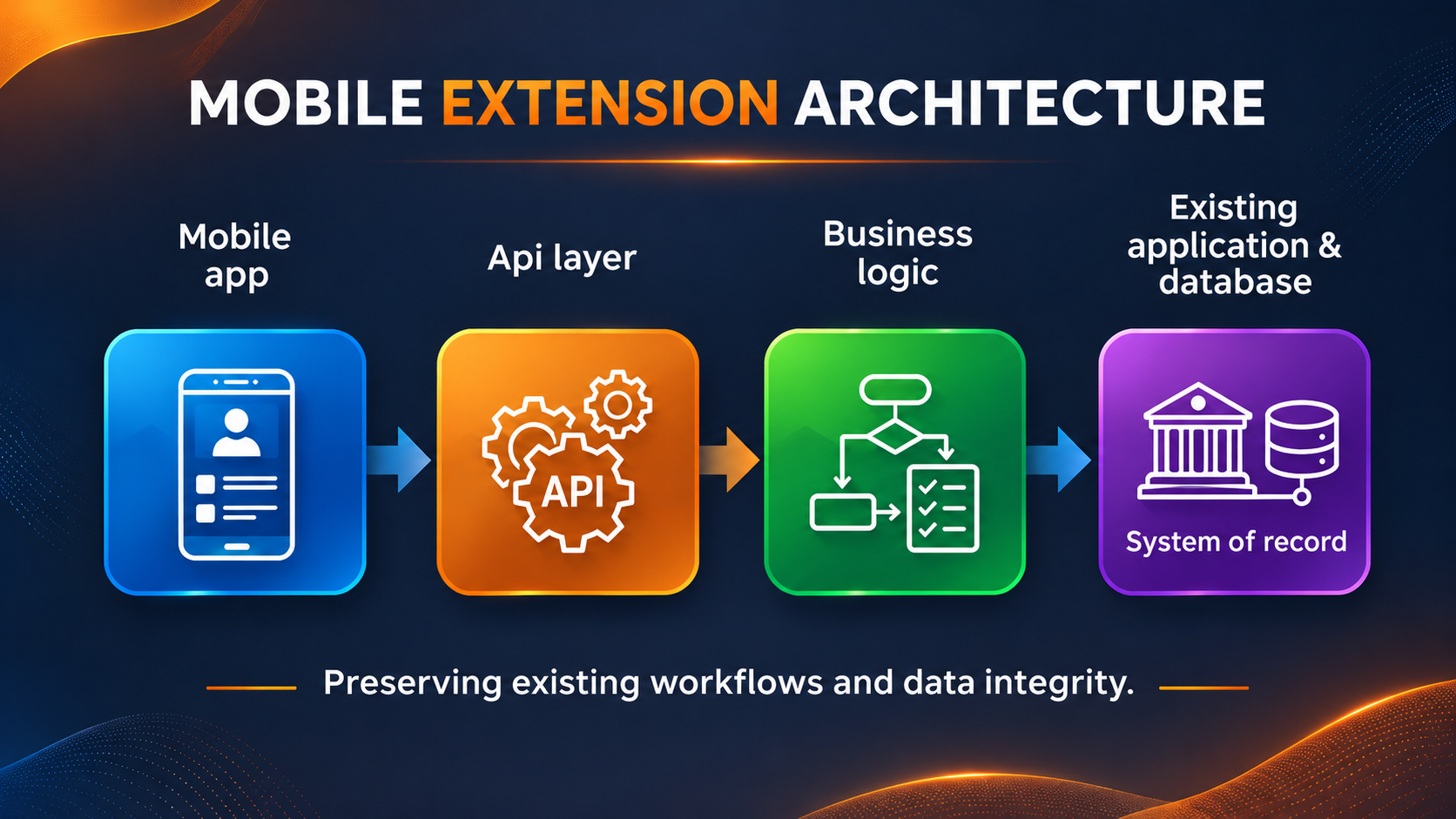
| Layer | Purpose |
|---|---|
| Mobile app | Provides the user interface. |
| API layer | Enables secure communication. |
| Business logic | Enforces validation and business rules. |
| Existing system | Maintains operational data. |
Three Ways to Extend Existing Software
- Use Existing APIs: Access inventory, orders, and other functions through supported APIs and permissions.
- Add Middleware or a Custom Backend: Transform data and coordinate requests while preserving business rules.
- Improve the Existing Application: Introduce APIs or update backend components when integration capabilities are limited. Avoid direct database access that bypasses validation.
The right approach depends on your existing system’s architecture and capabilities.
Challenges Businesses Should Evaluate Early
While many systems can be extended successfully, there are situations where additional complexity exists.
Outdated Technology
Legacy applications may rely on older architectures, programming languages, or infrastructure that make integration more difficult. Legacy systems can also introduce scalability, maintenance, compatibility, and security challenges that influence modernization decisions.
Security Requirements
Mobile devices frequently access sensitive business data outside traditional office environments. Organizations should consider:
- Authentication requirements
- Device management policies
- Access controls
- Data encryption
- Regulatory obligations
Enterprise mobile security has become increasingly important as mobile devices are now commonly used to access business systems and sensitive information.
Offline Functionality
Field teams often work in environments with limited connectivity. Questions to evaluate include:
- Should users be able to work offline?
- What data needs local storage?
- How will synchronization occur when connectivity returns?
Offline support can significantly influence technical design decisions.
User Permissions and Roles
Mobile users should only access information appropriate to their responsibilities. Existing permission models often need to be reviewed and extended into the mobile experience.
Should You Build a Mobile App or Modernize the Existing System?
One of the most common mistakes businesses make is assuming every mobility challenge requires a custom mobile app.
A manager who only needs to approve requests while travelling may be adequately served by a responsive web interface. A field technician who captures photos, records service details, and works offline may benefit more from a dedicated mobile app.
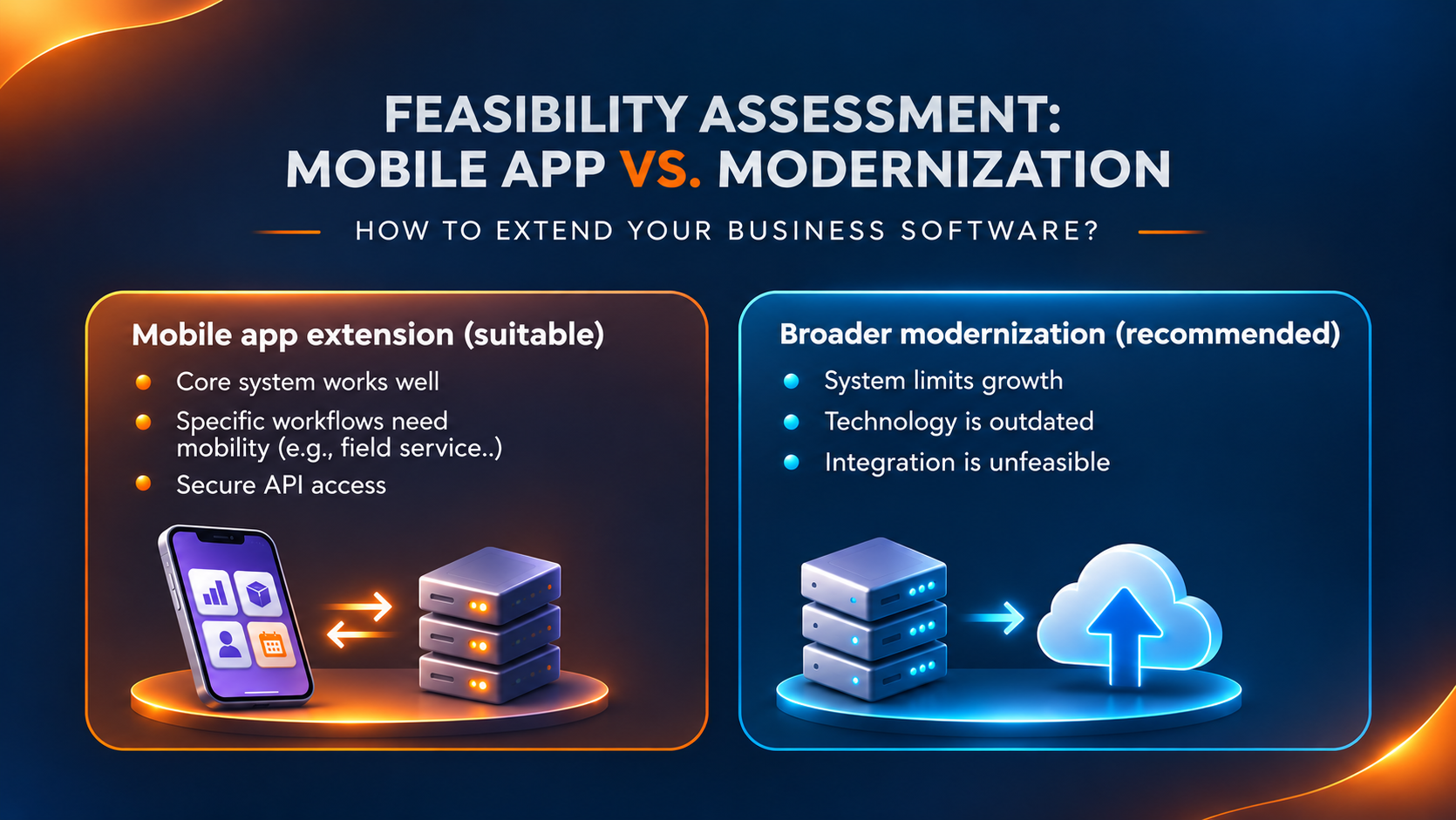
Sometimes a different solution may be more appropriate.
| Layer | Purpose |
|---|---|
| Mobile app | Provides the user interface. |
| API layer | Enables secure communication. |
| Business logic | Enforces validation and business rules. |
| Existing system | Maintains operational data. |
Application modernization is often a strategic evaluation process that considers business value, technical risk, scalability, security, and long-term objectives before deciding whether to extend, modernize, or replace a system.
The objective is to choose the solution that fits the business requirement, rather than assuming that every mobile requirement calls for a new app or a complete replacement.
A Quick Feasibility Checklist: Is Your Business Ready to Add a Mobile App?
Before investing in a mobile initiative, ask the following:
Technical Questions
- Does the software provide APIs?
- Can data be accessed securely?
- Is source code available?
- Is the system actively maintained?
- Are integrations already in place?
Operational Questions
- Which workflows truly need mobile access?
- Who will use the application?
- Do users require offline capabilities?
- What approval and security requirements exist?
Strategic Questions
- Is the current software expected to remain in use for several years?
- Are future modernization efforts already planned?
- Would mobile access solve the primary business problem?
The answers can help determine whether a mobile extension is practical and worthwhile.
How to Plan a Successful Mobile App?
Successful mobile extension projects begin by understanding the existing software, its architecture, integration capabilities, business workflows, security requirements, and long-term needs.
Once feasibility is established, businesses should follow these steps:
- Define mobile use cases: Identify users and required features, such as stock checks, delivery reports, or order entry.
- Map workflows: Document existing processes, data sources, and business rules.
- Assess integration: Review APIs, database dependencies, documentation, and infrastructure.
- Plan security and synchronization: Define permissions, data protection, offline access, and conflict resolution.
- Build and test: Start with a focused release and validate functionality, performance, and security with users.
- Plan maintenance: Account for updates, security patches, and future compatibility.
This structured approach helps businesses validate their solution before expanding its scope.
Extend Your Existing Business Software With Confianz
At Confianz, our custom software and mobile application development services cover areas such as backend development, API integration, application testing, and ongoing support. We believe the existing architecture and business workflows should be understood before recommending development or replacement. Explore our project portfolio to see examples of our software development experience.
For businesses using Odoo, the same principle applies: the appropriate approach depends on the required workflows, available integration capabilities, and the existing implementation.
Talk to Confianz about your current application, your team’s mobile requirements, and the technical considerations that could influence the solution. Explore our custom application development services to discuss your requirements.
A mobile app may be the next step for your business. The first step is finding out whether your existing software is ready for it.